How will you use these technology applications to improve learning experiences for your students and/or improve your own practice?
I picked a few of my favorites to talk about in this section:
Digital Photo Editing (Picnik): I loved the Picnik site! I think that this would be a great asset to my class in making some of the images that we use even more interesting and eye catching. It would be a great way to really pique the interest of the “artists” in my classroom. As I mentioned earlier in my blog, I have students complete a “Plot Study” project during our ecology unit. I would love to see a number of students use Picnik (or some other photo editing site) to enhance the photos they “collect” as a part of their “collection.”
Digital Storytelling: I will talk about this more later in this posting, but I would love to see what types of digital stories my students could create on a variety of topics in my class. There are a lot of “processes” that we talk about in biology: nutrient cycles, photosynthesis, cellular respiration, homeostatic responses, etc... that would lend themselves to nice digital storytelling projects. It would be a really nice end-of-the-unit project to have students create to really let them demonstrate their understanding of the topic.
Prezi: I must confess that I didn’t really like Prezi all that much before. The first time I saw Prezi was at the David Warlik conference I went to last fall. I thought it was great then! But then I tried to create one, and I was immediately turned off. Another teacher at school required all students to create a Prezi, and I heard lots of complaints from students (a lot of these were actually about getting dizzy from watching things zoom all over the place). But, I think that I will give Prezi another chance. Maybe I just didn’t try it with the right topic. I really like the one I created for the Cell Cycle, and I think that Prezi actually does a better job than PowerPoint for that particular topic since it is cyclical in nature—and Prezi can show that.
Quizlet: This will also be a definite addition to my teaching—especially for my anatomy and physiology students. I’ve just mentioned the site before and hoped that some students would explore the site and find out that it was really great. But it would also work to “assign” various groups of students to create flashcards for particular units. That way they could get flashcards for every unit and share the workload.
What effective teaching and learning strategy(ies), based on the work by Marzano (http://gets.gc.k12.va.us/VSTE/2008/ ) will these technology applications address, to make a difference in the learning experience for your students?
Nonlinguistic Representations: Digital photo editing, digital storytelling, Prezi, Quizlet (my favorite tools from this section) all incorporate nonlinguistic representations. I think that there are so many students who are visual learners (aren’t we all at some level?) who would greatly benefit from these tools.
Reinforce Effort and Provide Recognition: The quiz/survey assessment tools provided a means for reinforcing effort and providing recognition. I can see an application like Quizlet being used by a student to reinforce what they are learning and to provide recognition for them as to what they know or do not know. If they actually have to answer the question/define the term on the card before flipping it over, that will help them become a little more self-aware about what they really know.
Questions and Advanced Organizers: Applications like digital storytelling and Prezi require some advanced organizer skills as you set up your project. These are key skills for students to acquire and to learn how to use tools like advanced organizers to help them learn.
Choose one of the seven things and describe an activity or lesson you could use in your classroom. Include in the description how the lesson meets either a Michigan curriculum standard or another Educational Technology standard.
I think that I would really like to create an activity where students used a digital storytelling program to create a story regarding the cell cycle to demonstrate their knowledge. First, students would need to learn about the cell cycle. As a part of that learning, they would engage in various lab activities where they viewed cells in various stages of the cell cycle. They would need to take some digital photos of those cells (or sketch them and scan in the sketches) in order to use them in the digital story. We currently have one camera that mounts onto a microscope. But, a project like this might be just the impetus our department needs in order to buy a few more microscope mounted cameras (I hear they are wonderful!).
After obtaining the photos and images, students would need to order those images in the proper order and create a digital story demonstrating their knowledge of the cell cycle. There could be specific instructions and guidelines about what type of content material and knowledge needed to be demonstrated in both the photos/images and narration accompanying the images.
Michigan Curriculum Standard Covered:
B4.3A: Compare and contrast the processes of cell division (mitosis and meiosis), particularly as those processes relate to production of new cells and to passing on genetic information between generations.
Saturday, December 18, 2010

Thing #14
Online Video and Audio Resources
My school has a subscription to Discovery School/UnitedStreaming. I've used a lot of videos and video clips from this site. I've used them by just showing small clips or showing an entire video. I have downloaded small sections of videos and posted them onto my Moodle course. And I think that my tech coordinator was going to figure out how to sign my students up to go to the site and watch a video (if they are absent and the video is too big to fit on a site like Moodle).
This site allows you to search for videos/clips and then narrow it by content area, grade level, full clip or video, etc... One drawback I see to this site is that sometimes the videos are dated. That might not seem like such a big deal, but outdated videos in science are not a god thing. I really kind of wish that our school had a subscription to Learn360. Maybe if I ask a few more times :)
I find that video resources are so nice in science since science (at least life science) tends to be such a visual acitivity. However, I have used some audio resources before with various assignments (podcasts from places like NPR Science Fridays).
My school has a subscription to Discovery School/UnitedStreaming. I've used a lot of videos and video clips from this site. I've used them by just showing small clips or showing an entire video. I have downloaded small sections of videos and posted them onto my Moodle course. And I think that my tech coordinator was going to figure out how to sign
 my students up to go to the site and watch a video (if they are absent and the video is too big to fit on a site like Moodle).
This site allows you to search for videos/clips and then narrow it by content area, grade level, full clip or video, etc... One drawback I see to this site is that sometimes the videos are dated. That might not seem like such a big deal, but outdated videos in science are not a god thing. I really kind of wish that our school had a subscription to Learn360. Maybe if I ask a few more times :)
I find that video resources are so nice in science since science (at least life science) tends to be such a visual acitivity. However, I have used some audio resources before with various assignments (podcasts from places like NPR Science Fridays).
Thing #13
Online Interactive Learning Tools
Google Earth Location

I picked Potato Creek State Park in Indiana (just south of South Bend). This is a state park we found a few years ago because it was half-way between my brother and sister-in-law in Chicago and us in Grand Rapids. It's nothing super fancy, but it has worked very well for us. I'm sure we will go back for years to come :)
Google Earth Placemark
We are going to Washington, D.C. for Spring Break this year. My husband has never been to Washington, D.C., so I'm very excited that he will be able to see some of the sites there. One of my favorite places to go there is to Arlington National Cemetary. I could spend all day walking around and visiting the Tomb of the Unknown Soldier. So, that is what I picked to Placemar k.
k.
 k.
k.Quizlet
I definitely plan on using this with my students in the future. The Anatomy & Physiology course that I teach involves a lot of terminology (almost seems like a foreign language sometimes). And not only do students need to learn the terminology, then they need to be able to put those terms to use as they describe and explain how the different body systems function. Since it is an upper-level elective course for mostly for students who are interested in health care related careers, I do ask them to learn a lot of terminology. And that's hard. So, I think that a site like Quizlet would be a great place to send kids to make flashcards and play games as they study. One downfall I found is that in order to upload photos, you needed to pay for a subscription. It was only $10 for the year which might be more than worth it if that's what it would take to really help students. But, it would be nice if it was free. There were some free images you could use, but they were limited, not necessarily what I wanted (especially for an upper level science course), and the search function wasn't all that great.
Thing #12
Evaluation/Assessment and Survey Tools
Google Forms
Love it! I learned about these in a technology presentation from a colleague who was embedding these into his Moodle site and using them as "brainstorming" activities or "bell beater" activities. I've found a number of ways to use them including a li ttle "quiz" students take about me at the beginning of the year, a way to collect e-mail addresses, a way to collect updated data information for my dissertation, etc... Overall, I love this application! I didn't the "summary response" tools existed. I will definitely be looking that those from here on out.
Rubistar
I created a rubric for the Spinach Leaves Lab that students complete during our unit on Photosynthesis and Cellular Respiration. As a part of this activity, students place spinach leaves in a jar and connect an oxygen gas measuring probe and a carbon dioxide measuring probe to the jar. A computer program (Logger Pro--Vernier program) then caputures the data from the probles. Students experiment with different variables (light levels, light colors, temperature, etc...) and then watch what happens to the amount of oxygen and carbon dioxide in the jar. They analyze the data and draw some conclusions regarding the rates of photosynthesis and cellular respiration under those experimental conditions. Currently, I have a form with questions for them to fill out. However, as a part of our NCA (AdvancEd now...or something like that) work, I need to have a rubric assignment where I can gague how well students do analysis. This seemed like a great assignment to "tweak" inorder to fit that goal.
Data Warehousing
I must admit that I am pretty unaware when it comes to knowing about anything related to data warehousing in my district. One of the tools mentioned was Moodle, and I am aware of that. I guess our grading program/student management system would be considered data warehousing. It is the Blackbaud system, and I am not a fan. The grading component of it is NetClassroom, and it is not user friendly for the teacher or the student/parent accessing the information. I think that student management systems like this and course management systems could be used to inform instruction in several ways. First, when I give a test, I would love to have a simple, easy way to analyze test questions to show me which ones students were missing with more frequency. I guess if I put all my tests on Moodle, I could get that information. But I don't have all my tests there, so now I just have to rely on a feeling that I get while correcting and noticing that more students seem to be getting particular questions wrong. I think it would be really interesting to see a data analysis of our students scores on a test like the ACT or MME to see what content areas students seem to be struggling with. Of course, FERPA/HIPAA is very important and student confidentiality and privacy need to be respected and protected.
Google Forms
Love it! I learned about these in a technology presentation from a colleague who was embedding these into his Moodle site and using them as "brainstorming" activities or "bell beater" activities. I've found a number of ways to use them including a li
 ttle "quiz" students take about me at the beginning of the year, a way to collect e-mail addresses, a way to collect updated data information for my dissertation, etc... Overall, I love this application! I didn't the "summary response" tools existed. I will definitely be looking that those from here on out.
Rubistar
I created a rubric for the Spinach Leaves Lab that students complete during our unit on Photosynthesis and Cellular Respiration. As a part of this activity, students place spinach leaves in a jar and connect an oxygen gas measuring probe and a carbon dioxide measuring probe to the jar. A computer program (Logger
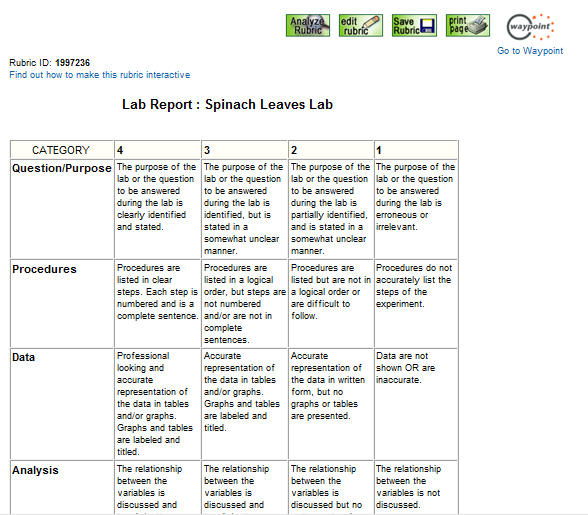 Pro--Vernier program) then caputures the data from the probles. Students experiment with different variables (light levels, light colors, temperature, etc...) and then watch what happens to the amount of oxygen and carbon dioxide in the jar. They analyze the data and draw some conclusions regarding the rates of photosynthesis and cellular respiration under those experimental conditions. Currently, I have a form with questions for them to fill out. However, as a part of our NCA (AdvancEd now...or something like that) work, I need to have a rubric assignment where I can gague how well students do analysis. This seemed like a great assignment to "tweak" inorder to fit that goal.
Data Warehousing
I must admit that I am pretty unaware when it comes to knowing about anything related to data warehousing in my district. One of the tools mentioned was Moodle, and I am aware of that. I guess our grading program/student management system would be considered data warehousing. It is the Blackbaud system, and I am not a fan. The grading component of it is NetClassroom, and it is not user friendly for the teacher or the student/parent accessing the information. I think that student management systems like this and course management systems could be used to inform instruction in several ways. First, when I give a test, I would love to have a simple, easy way to analyze test questions to show me which ones students were missing with more frequency. I guess if I put all my tests on Moodle, I could get that information. But I don't have all my tests there, so now I just have to rely on a feeling that I get while correcting and noticing that more students seem to be getting particular questions wrong. I think it would be really interesting to see a data analysis of our students scores on a test like the ACT or MME to see what content areas students seem to be struggling with. Of course, FERPA/HIPAA is very important and student confidentiality and privacy need to be respected and protected.
Thing #11
 Presentation Tools
I created a Prezi on the Cell Cycle and cell division: http://prezi.com/cbrm_vhbf17g/mitosis/
This is a great topic for a Prezi because it is a cycle. The visual layout of a Prezi really helps communicate that concept.
I think that Prezi and PowerPoint presentations each have their place. For a concept like the cell cycle, a Prezi is a nice visual way to display not only the content of each of the stages of the cell cycle, but also shows how those stages all fit together. However, organizing the Prezi can sometimes be more trouble than it is worth. I've given students the option of creating a Prezi or PowerPoint for some of their presentation projects. One complaint that I often get is that all the zooming that Prezi does makes people a little "motion sick." Plus, unless the concept does have a nice "story" to it, Prezi just seems like a fancy, zoomy way to present the same information. But I do think that there are concepts (like the cell cycle) that would lend themselves to good, quality Prezi presentations.
One thing I did think about as I was creating this was how I was probably violating some copyright laws. I often use images (under fair use) in my presentations. But then the presentations are only available either in my classroom (during class time) or on my Moodle, password-protected site. However, creating this Prezi (at least on the free Prezi program) makes the presentation available out there on the web. So what kind of copyright issues does that bring up? If you were going to place "things" in a Prezi that would normally be okay because you were "covered" under the fair use guidelines, what happens when that Prezi is now public?
Here is a screen shot of a website with mitosis picutures that I used ZoomIt on. I think this is really nice for highlighting areas of the screen, getting students to focus in on just one section of the screen (if the page is particularly "busy"), and obviously for visually impaired students. The draw option was probably the thing that I would choose to use more often since it was so easy.
Thing #10
 Digital Storytelling
I chose to make a digital story about the cell cycle. This is one of the next topics that we cover in class. As in a lot of biology topics, this is a very visual topic where we look to see the cell dividing and pulling apart it's chromosomes.
First, I created a storyboard for my digital story. I used bubbl.us; however, I'm not a real fan of that program. I use Inspiration more often. But, I realize that bubbl.us is free and web-based. So, I guess it will work.
Then, I downloaded and opened Photo Story to begin my digital story. Well, since I am doing this a little "last-minute," I didn't have access to all the digital images of cell division that I wished I had. And, looking at the ones available on Picassa and Flickr, I think that I might actually have students take photos while we go through the cell division unit and have them create their own digital stories of the cell cycle. Anyway, it was just easier for me to grab family photos that I already had saved on my computer. So, I made a family digital story project about what happened with our family during 2008.
Once I made and saved the story, I tried to go and put it on my Weebly site, but something was wrong with Weebly (they were "fixing" something). So, I created a Voice Thread account, created a project, and uploaded my story there. So, I think that this is the link that you need to see the story:

The feedback that I got was mostly about the time spent on each slide and some of the transitions. I realized after creating the story that you can control the amount of time spent on each slide (clearly I should have messed around more with the first few images). I did go and chance the time spent on each slide, but that was kind of a pain. I didn't narrate anything since I hate listening to my recorded voice, and my microphone is tucked away in the basement right now. But, I think that students might like narrating it (they constantly ask me to "Jing" things just so they can be really loud and then listen to themselves on the playback).
Digital Storytelling in My Classroom
As I mentioned earlier, I can see a great opportunity for a digital story telling project in some of my units like the cell cycle, photosynthesis, cellular respiration, etc... Actually, this would make a great project for those topics because, to be honest, those topics are sometimes not exactly the most exciting things that we cover in the course of the year. So, this would be a nice way to add some excitement. And, in doing so, I think that students might really learn the material if they needed to manipulate the information and create a story out of it.
Thing #9
Digital Images
Digital Photo Editing
 I opened a photo in Picassa and then edited it in Picnik. Included screen shots of before and after editing.
Public Photo-Sharing
Digital Photo Editing
 I opened a photo in Picassa and then edited it in Picnik. Included screen shots of before and after editing.
Some of the editing features I applied in Picnik:
1960s, cross-process, HDR-ish, and Holga-ish. I adjusted each effect so that I ended up with an image with interesting contrast and color and nice rounded corners.
I can see lots of neat ways to use this type of resource in my classroom. One of the first ways  that comes to mind is having students use this resource in conjunction with their Plot Study project. One part of their project is to do a "virtual collection" of organisms--photos of a variety of flowers, animals, fungus, trees, etc... Last year one student had AMAZING photos that she had clearly edited. I asked her what program she had used, and she explained she had used Picnik. Picnik was an easy program to use, and it made the photos look so interesting and neat.
 that comes to mind is having students use this resource in conjunction with their Plot Study project. One part of their project is to do a "virtual collection" of organisms--photos of a variety of flowers, animals, fungus, trees, etc... Last year one student had AMAZING photos that she had clearly edited. I asked her what program she had used, and she explained she had used Picnik. Picnik was an easy program to use, and it made the photos look so interesting and neat.
One of my goals is not only to teach students the content (science, in my case), but also to teach them some "life skills" and expose them to programs and ideas that they might use in the future. For instance, I had students use Dropbox last week. Even though our school filter doesn't allow students to upload or download to Dropbox, I still made them all sign up and accept an invitation from me to a shared folder. I think this is something that a few students might really like (especially if they look in the folder at home over break and realize they can open and save into it to complete their assignment). Likewise for Picnik and other programs like that. Even if they don't use the program all that often in my class, I think it's worth it to expose students to technology like that so that they know it exists and is out there.
One other reason I really liked Picnik and the other photo editing programs was that it made the photos look so cool that I said, "wow!" One of my goals for teaching is to inspire an awe and wonder in the natural world that God has created. And I can freely articulate that since I teach at a private Christian school. Spending time editing an image does help you reflect on how beautiful even the most simple things in life can be.
Public Photo-Sharing
I uploaded an image to Picassa and here is the link: http://picasaweb.google.com/lh/photo/Sfz3bl91op8t3vrwFlU87A?feat=directlink
Here is the photo that I shared (just to use the embed code):

Subscribe to:
Posts (Atom)